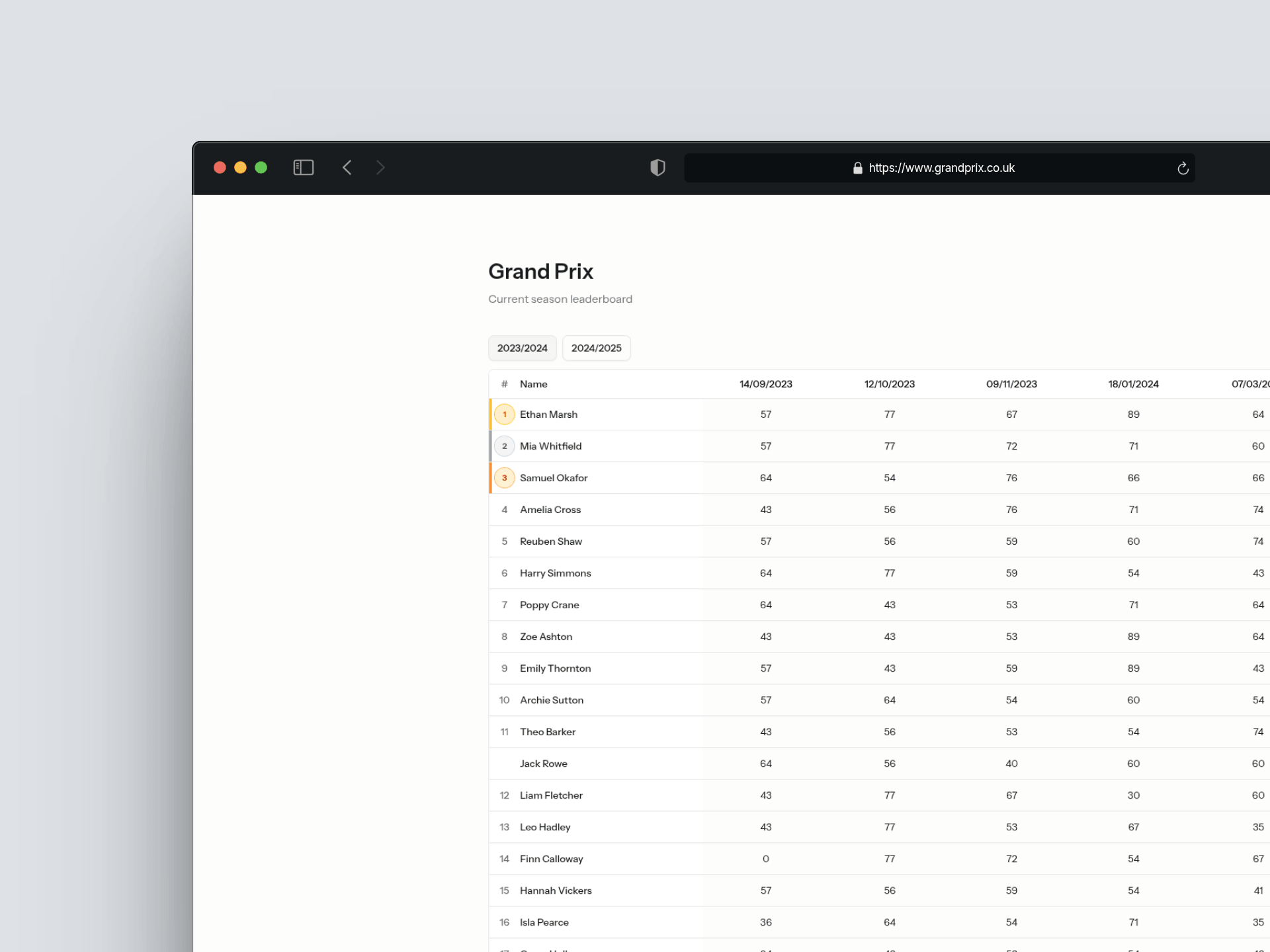
Whilst I am in the process of learning Laravel, I fancied a small project that touches on many of the key aspects of the framework. Thus began my hunt for a pain point in someone's life. So, here we are again, another project related to volleyball.
My club runs a development session for beginner players once per week. The first Thursday of every month is Grand Prix night. Essentially, this is a round robin tournament for everyone to relax and have fun with. Teams are selected by the coach and change every time. Games are timed and they play each other at least once. At the end of each match, the team goes to the coach and tells them their score. This is an individual competition. Each player receives their team's final score as their personal points for that session. There is also a rule to stop players falling too far behind when they miss a session: if a player is absent, they are automatically awarded ten points less than their lowest attended score that season. At the end of the season the top 3 players win a prize. At the moment, the coach writes the scores on to a white board, takes a photo and then uploads the scores for each player manually onto a leaderboard website. This sounds like an absolute ball ache. I knew then, I could make this process much more pleasant.
Why I Chose This Stack
As I mentioned earlier I am in the process of learning Laravel and this problem fits this framework perfectly. As I am familiar with React as a framework, Inertia provides the perfect bridge between learning something new and continuing with something I am comfortable with.
Planning the Data Model
Before writing a single line of code, I needed to understand what this project was and its scope. I broke it down into the entities I'd need and the relationships between them.
The tables I landed on were: Season, Player, Session, Team, PlayerTeam, Round, RoundScore, and SessionPlayer. Most of these were straightforward, but a couple of fields needed deliberate thought. The is_active field on Player exists so that if someone leaves the club or takes a season break, they won't be included in the leaderboards. The attended field on SessionPlayer was added specifically to support the absence penalty. When calculating a missing player's score, I can look back at that table and find the lowest score where attended === true.
The relationships followed naturally from there. A Season has many Sessions, a Session has many Teams, a Round belongs to a Session, and so on. Getting this right before touching code meant I wasn't making structural decisions mid-build.
Introducing TDD
I'd never written a test before this project. Before starting I did some research into Pest and stumbled across Test Driven Development. The idea is to write a failing test first, write just enough code to make it pass, then refactor. Red, green, refactor.
The first thing I noticed was how uncomfortable it felt. That instinct to just build was strong. TDD forces you to slow down and think about what the code should do before writing any of it, and that took real adjustment. I also wasn't sure at first what even needed a test and what didn't, but I treated that uncertainty as part of the process rather than a reason to skip it.
The most telling moment came when I caught myself breaking the rule mid-flow. I'd written validation code before writing the tests for it, realised what I'd done, removed it, wrote the tests to confirm they failed, then re-added the code to make them pass. That small moment of discipline, deleting work I'd just written, is probably what made the approach stick.
That instinct to just write the code first is strong. TDD fights it directly. By the end of the project I'd grown to appreciate the feedback loop. A failing test tells you exactly what needs to exist before you've written a single line of production code.
Challenges & Solutions
Real-world constraints changing the architecture
My original plan for the tournament scoring screen was to send a POST request every time a score was entered or a round added, keeping everything server-side. It seemed clean. Then I thought harder about who would actually be using this: a coach on their phone inside a sports hall. In the UK especially, sports halls are notorious for having very poor mobile signal and incredibly weak Wi-Fi. Sending multiple requests in that environment was a recipe for lost data. The solution was to batch everything into a single request at the point of submission, rather than persisting each change to the server as it happened. This also meant rethinking the test structure and the data shape going into the backend.
Structuring nested routes correctly
When it came to Rounds, I had to decide whether /rounds should be its own top-level route or nested under tournaments. A round can't exist outside of a tournament, so a top-level route never made sense. I went with /tournaments/{tournament}/rounds instead. This makes the relationship explicit in the URL and means the tournament ID is always available from the route without any additional lookups.
React component state and useContext
The tournament creation screen needed teams, players, and drag-and-drop, which meant a lot of shared state across several components. My first instinct was to pass everything down as props, but that quickly became unwieldy. This is what led me to useContext, creating a provider at the top level so any child component can access the data it needs without threading props through every layer.
What I'd Do Differently
I'd planned the scoring flow as a series of server-side requests, wrote tests around that design, and only later realised the real-world context (poor mobile signal in a sports hall) made that approach fragile. Catching it wasn't failure, but if I'd thought harder about the end user environment during planning, I'd have saved myself the rewrite.
The same is true of TDD. I had to unlearn the instinct to code first. If I started again I'd be stricter with myself earlier. Write the test, watch it fail, then write the code. I slipped more than once.
One major change I want to make going forwards is involving real users earlier in the process. I tunnel vision when I build (as I am sure other developers do too), so the terminology, flow, and structure make perfect sense in my head but can feel unintuitive to someone using it for the first time. More importantly, I built this because I identified one pain point. What I should have done is sit down with the coach first and asked broader questions. There may be five other frustrations in their workflow I've never even considered, and solving those might be more valuable than anything I'd come up with alone.
What's Next
The immediate next steps are adding localStorage to the tournament scoring flow as a persistent safety net so if the page is closed or the browser crashes mid-session, the data survives until a successful submission clears it. Beyond that, a player analytics page giving the admin a view of each player's attendance, points total, and how they're trending across the season, alongside improvements to the leaderboard to make it clearer when a score was calculated from absence rather than actually played.
A nice feature would be a multi-tenant system where other clubs can sign up, manage their own players and tournaments, and have their own public-facing leaderboard pages. Right now this is built for one club, but the underlying structure already lends itself to that kind of expansion.
Updates
Local Storage for Tournament Scoring
12 June 2026 · Read full update
Added localStorage persistence for tournament status and round scoring so a lost signal or page refresh doesn't take the data with it.